Cookieless tracking sounds almost too good to be true: you measure your website traffic, but you skip the consent banners, the legal risk, and the privacy concerns that come with traditional cookies. Yet it’s a real, mature approach that many sites already use. In this guide, I’ll explain how cookieless tracking works, what it can and can’t do, and how to set it up on your own site.
When I first moved a client away from cookie-based analytics, I expected to lose half my data. Instead, I gained cleaner numbers and a faster site. Cookieless tracking isn’t a downgrade — for most small websites, it’s an upgrade that respects visitors and simplifies compliance at the same time.
What Is Cookieless Tracking?
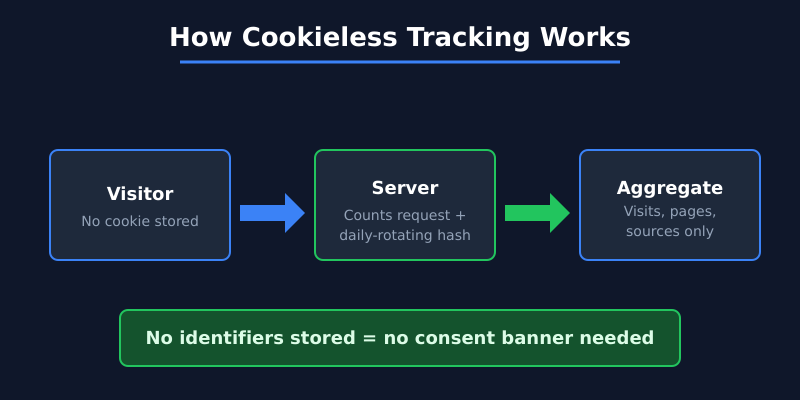
Cookieless tracking measures website activity without storing identifiers on the visitor’s device. Traditional analytics drop a cookie in the browser to recognize returning users. Cookieless tracking skips that step entirely and relies on other signals to count visits and pages.
Because no personal identifier is stored, this approach avoids the legal trigger that requires a consent banner under GDPR. As a result, you can collect aggregate data the moment a visitor arrives — no interruption, no opt-in, no friction. That’s the core appeal of cookieless tracking.
Key point: Cookieless tracking measures patterns, not people. You learn how your site performs without building a profile of any individual visitor.
How Cookieless Tracking Actually Works
So if there’s no cookie, how does the tool know what’s happening? Several techniques make it possible, and most privacy-first platforms combine them:
Server-side counting — The server logs page requests directly, without browser storage
Anonymous session hashing — A temporary, non-reversible hash groups a single visit without identifying the person
Referrer and page data — Where visitors came from and what they viewed, with no identifiers attached
Daily-rotating salts — Even the temporary hash resets regularly, so no cross-day tracking occurs
These methods deliver the metrics most owners care about — visitors, page views, sources, popular pages — while discarding anything that could identify a person. Consequently, the data stays useful and the privacy stays intact.
Cookies vs Cookieless: What You Gain and Lose
It’s worth being honest about the trade-offs. Cookieless tracking isn’t perfect for every use case. Here’s a straightforward comparison:
Capability
Cookie-based
Cookieless
Page views and visitors
Yes
Yes
Traffic sources
Yes
Yes
Consent banner needed
Usually yes
Usually no
Cross-session user tracking
Yes
Limited or none
Long-term individual journeys
Yes
No
Privacy compliance effort
High
Low
The main thing you give up is following one person across many visits over time. For most small businesses, though, that level of detail was never actionable anyway. As I argue in my piece on overcomplicated analytics, more granularity rarely leads to better decisions.
The Privacy and Compliance Benefits
Beyond the cleaner reports, cookieless tracking delivers real compliance advantages. Specifically, you benefit in several ways:
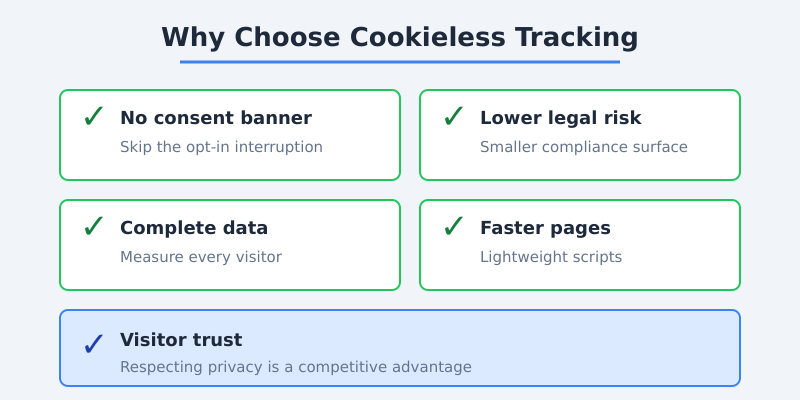
No consent banner — Without identifiers, you typically don’t need cookie consent
Lower legal risk — Less personal data means a smaller compliance surface
Better data completeness — You measure everyone, not just those who clicked “Accept”
Faster page loads — Lightweight scripts beat heavy tracking libraries
Visitor trust — Respecting privacy is increasingly a competitive advantage
That fourth point matters more than people realize. When you require consent, you only measure the visitors who agree. With cookieless tracking, your numbers reflect the full picture. Therefore, your reports are often more accurate, not less.
How to Set Up Cookieless Tracking
The good news is that switching is usually simple. Most privacy-first analytics tools are cookieless by default. Here’s the general process:
Choose a cookieless tool — Plausible, Fathom, and Umami all qualify out of the box
Add the tracking script — Paste a single lightweight snippet into your site’s header
Remove old cookie-based tags — Clean up any leftover Google Analytics or similar scripts
Reassess your consent banner — If cookies are gone, you may be able to remove it
Update your privacy policy — Disclose your cookieless approach honestly
For WordPress sites, most tools offer a plugin that handles installation for you. Otherwise, adding the script to your theme header takes a minute. You can read more about lightweight implementations in the Plausible documentation or the Umami setup guide if you prefer to self-host.
Caution: Before removing your consent banner, confirm you have no other cookie-setting scripts. Embedded videos, ad pixels, and chat widgets can all set their own cookies.
Does Cookieless Tracking Work With Server-Side Setups?
Yes — and in fact, server-side tracking pairs naturally with the cookieless approach. Instead of running tracking entirely in the browser, a server-side setup processes events on your own infrastructure before forwarding aggregate data to your analytics tool. As a result, you gain even more control over what leaves your environment.
This does add some technical overhead. You’ll need a server endpoint to receive and process events, which is more involved than pasting a script. For most small sites, the standard cookieless script is plenty. However, if you’re already comfortable with server infrastructure, combining the two gives you both privacy and resilience against browser-based blockers.
When Cookieless Tracking Isn’t Enough
To be fair, cookieless tracking has limits. There are scenarios where it falls short:
Detailed ad attribution — Following a user from ad click to purchase across sessions
Long sales cycles — Tracking individuals over weeks or months
Personalized retargeting — Building audience profiles for advertising
If your business depends on these capabilities, you’ll need cookie-based tracking with proper consent. For everyone else, though, the cookieless approach covers the essentials. My guide to what small businesses should track shows just how few metrics most sites genuinely need.
Bottom Line
Cookieless tracking gives you honest, useful website data without the consent banners and legal complexity of traditional cookies. It works by counting patterns rather than profiling people, which keeps you on the right side of privacy regulations while delivering the metrics that matter.
For most small websites, cookieless tracking is the simpler, cleaner choice. You measure every visitor, load your pages faster, and skip the compliance headaches. In my experience, once you try it, the old cookie-heavy approach feels like unnecessary baggage you’re glad to leave behind. If you are leaving Wide Angle Analytics when it closed on 31 August 2026, a cookieless tool is the natural place to land.
Closure confirmed 9 September 2026: the service is gone and its domain now redirects to the parent company.
Eleanor Weiss
Privacy-first analytics
Eleanor Weiss is a certified digital marketer (Google Analytics IQ, HubSpot Inbound) with 10+ years of experience in website analytics. After spending weeks trying to figure out GA4, she asked herself: why? Most websites don't need complex funnels and machine learning. They need simple answers. That's why she started PrivacyAnalytics.io — honest reviews of privacy-friendly analytics tools that just work.




 Eleanor Weiss
·
8 min read
Eleanor Weiss
·
8 min read