Google Analytics powers millions of websites, yet a single question keeps tripping up owners across Europe: is Google Analytics GDPR compliant? The honest answer is “not by default.” However, the full picture is more nuanced than a simple yes or no, and understanding it could save you from fines, legal headaches, and a lot of wasted configuration time.
I migrated away from Google Analytics myself after spending weeks wrestling with consent settings that never quite felt watertight. In this guide, I’ll explain exactly where Google Analytics stands with GDPR, what regulators have actually ruled, and the practical choices you have as a website owner.
The Short Answer: It’s Complicated
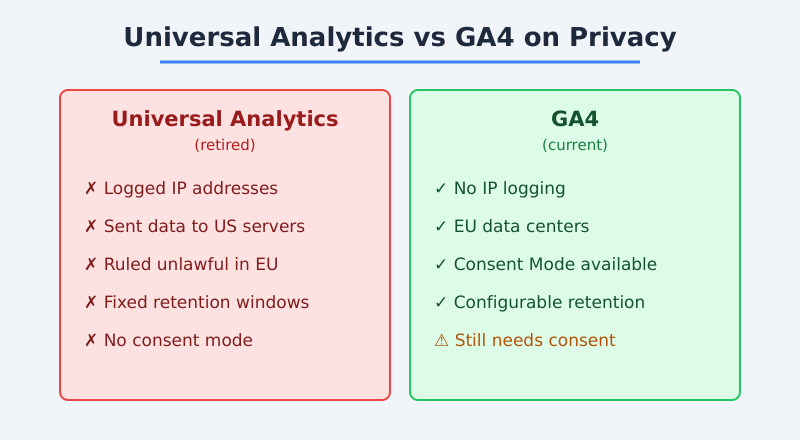
Google Analytics is not automatically GDPR compliant when you install it. Out of the box, it collects personal data — including IP addresses and unique identifiers — and historically sent that data to servers in the United States. Consequently, several European data protection authorities have ruled standard implementations unlawful.
That said, Google has made significant changes. GA4, the current version, no longer logs IP addresses and offers EU-based data processing. Therefore, a carefully configured GA4 setup can move much closer to compliance. The key word is “configured” — the default settings won’t get you there.
Bottom line: Google Analytics can be made GDPR-friendlier, but it requires consent, careful configuration, and ongoing attention. It is never compliant simply because you pasted the tracking code.
What GDPR Actually Requires
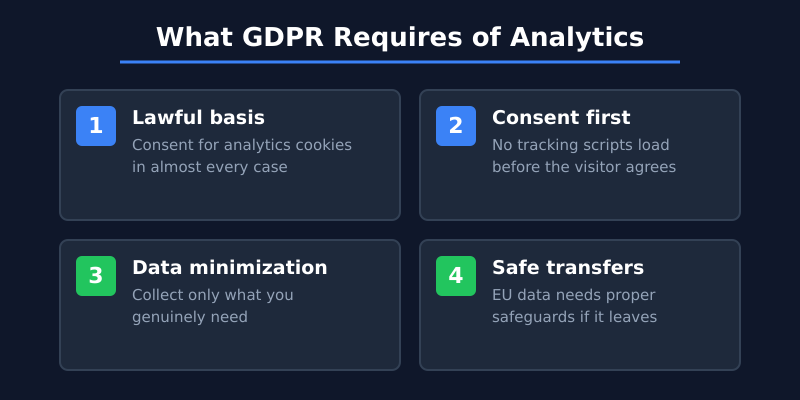
Before judging any tool, you need to know what the law asks of you. The General Data Protection Regulation sets several requirements that directly affect analytics:
Lawful basis for processing — For analytics cookies, that basis is almost always explicit consent
Consent before tracking — You can’t load tracking scripts until the visitor agrees
Data minimization — Collect only what you genuinely need
Transparency — Tell users what you collect and why
Adequate international transfers — Personal data leaving the EU needs proper safeguards
As I explained in my guide to GDPR and website analytics, IP addresses and cookie identifiers count as personal data. As a result, most analytics setups fall squarely under GDPR’s scope.
Why Regulators Ruled Against Google Analytics
The biggest problem wasn’t the tracking itself — it was where the data ended up. Under the earlier Universal Analytics, data flowed to US servers. Following the 2020 Schrems II ruling, the EU’s top court invalidated the framework that had permitted those transfers.
What happened next was a wave of enforcement. Specifically, several national authorities investigated and found violations:
Authority
Finding
Austria (DSB)
Ruled standard Google Analytics use unlawful due to US data transfers
France (CNIL)
Found Google Analytics transfers insufficiently protected; ordered changes
Italy (Garante)
Declared a website’s use non-compliant and warned others
These rulings targeted Universal Analytics, which Google has since retired. Nevertheless, they reshaped how seriously website owners treat the question. For the latest official guidance, the European Data Protection Board remains the authoritative source, and the original complaints from privacy group noyb document how the enforcement wave began.
How GA4 Changed Things
GA4 replaced Universal Analytics and addressed some of the headline concerns. Notably, it brought several privacy-oriented changes:
No IP logging — GA4 does not store IP addresses, removing one major data point
EU data centers — Initial data collection can happen on EU servers before processing
Consent Mode — A mechanism to adjust data collection based on user consent
Shorter data retention — Configurable retention windows, down to two months
However, these improvements don’t make GA4 compliant on their own. The tool still relies on consent for cookie-based tracking, and some data may still reach Google’s broader infrastructure. In other words, you’ve reduced the risk, not eliminated it.
Steps to Make Google Analytics More GDPR-Compliant
If you want to keep using Google Analytics, you can reduce your risk considerably. Here’s the practical checklist I’d follow:
Add a consent banner — Block GA4 until the visitor opts in to analytics cookies
Shorten data retention — Set retention to the minimum your reporting needs
Disable data sharing — Turn off optional sharing with Google products and benchmarking
Update your privacy policy — Disclose GA4 use, data collected, and user rights
Sign the data processing terms — Accept Google’s data processing addendum in your account
Important: Even with all of these steps, a consent banner means you’ll lose data from visitors who decline. For many small sites, that gap makes Google Analytics less useful than the privacy-first alternatives.
It’s also worth noting that configuration isn’t a one-time job. Google updates GA4 regularly, and privacy guidance evolves alongside it. Therefore, you’ll need to revisit your settings periodically to stay aligned. Google documents the relevant controls in its data deletion and retention help pages, but the responsibility for keeping everything compliant ultimately rests with you, not the platform.
What About Consent Mode?
Google’s Consent Mode deserves a closer look, because it’s often misunderstood. Consent Mode adjusts how GA4 behaves based on whether a visitor has granted consent. When consent is denied, it sends anonymized, cookieless signals instead of full tracking data.
On paper, this sounds like a tidy solution. In practice, though, it raises its own questions. The “consentless” pings still transmit some data to Google, and privacy advocates debate whether that fully satisfies GDPR. Consequently, Consent Mode reduces your exposure without eliminating it. I treat it as a risk-reduction tool, not a guarantee of compliance.
The Simpler Alternative: Skip the Problem Entirely
Here’s the approach I eventually took. Instead of fighting to make Google Analytics compliant, I switched to tools that don’t collect personal data in the first place. When a tool doesn’t use cookies or store identifiable information, the GDPR consent requirement largely falls away.
Privacy-first analytics platforms typically work without cookies, anonymize data by design, and keep everything on EU servers. As a result, you often avoid the consent banner altogether — which means more complete data and fewer legal worries. For most small businesses I’ve worked with, this trade-off is a clear win.
If you’re weighing your options, my breakdown of what small businesses should actually track is a good place to start. You’ll likely find you need far less than Google Analytics offers anyway.
When Google Analytics Still Makes Sense
To be fair, Google Analytics isn’t always the wrong choice. It still has genuine strengths:
Deep integration with Google Ads for advertisers
Advanced segmentation and exploration reports
A massive ecosystem of tutorials and support
It’s free, which matters for tight budgets
If you run paid campaigns and rely on Google’s advertising tools, GA4 may be worth the configuration effort. For everyone else, though, the privacy-first route is usually simpler and safer.
Bottom Line
So, is Google Analytics GDPR compliant? Not on its own — but with consent, careful configuration, and ongoing maintenance, a GA4 setup can come much closer. The retired Universal Analytics drew enforcement actions across Europe, and GA4 improved matters without fully resolving them.
For most small website owners, the easier path is to avoid the question entirely by choosing a privacy-first tool that doesn’t collect personal data. You get cleaner numbers, fewer banners, and far less to worry about. In my experience, that simplicity is worth more than any feature Google Analytics offers.
Eleanor Weiss
Privacy-first analytics
Eleanor Weiss is a certified digital marketer (Google Analytics IQ, HubSpot Inbound) with 10+ years of experience in website analytics. After spending weeks trying to figure out GA4, she asked herself: why? Most websites don't need complex funnels and machine learning. They need simple answers. That's why she started PrivacyAnalytics.io — honest reviews of privacy-friendly analytics tools that just work.




 Eleanor Weiss
·
12 min read
Eleanor Weiss
·
12 min read